When leaders hear "email-based attack," most picture a phishing message — bad grammar, suspicious link, easy to spot. That mental model is what makes Business Email Compromise so effective. BEC looks nothing like phishing, bypasses the same controls that stop phishing, and now causes more direct financial loss than any other category of business cybercrime.
The FBI's Internet Crime Complaint Center has ranked BEC as the single largest cybercrime category by reported financial losses for several consecutive years. The losses run into the billions of dollars annually, and the typical incident is dramatically larger than a ransomware payout — wire fraud routinely takes six and seven figures from a single message that no filter saw as suspicious.
The reason these numbers are still climbing isn't that security tools have failed. It's that the controls most organizations rely on — email filters, link scanning, antivirus, employee phishing training — were built for a different threat. They're designed to detect malicious payloads. BEC doesn't use any.
The Fundamental Difference
Phishing and BEC are both email-based, but treating them as the same threat is the mistake that keeps companies losing money. Each one bypasses a different set of controls and requires a different defense.
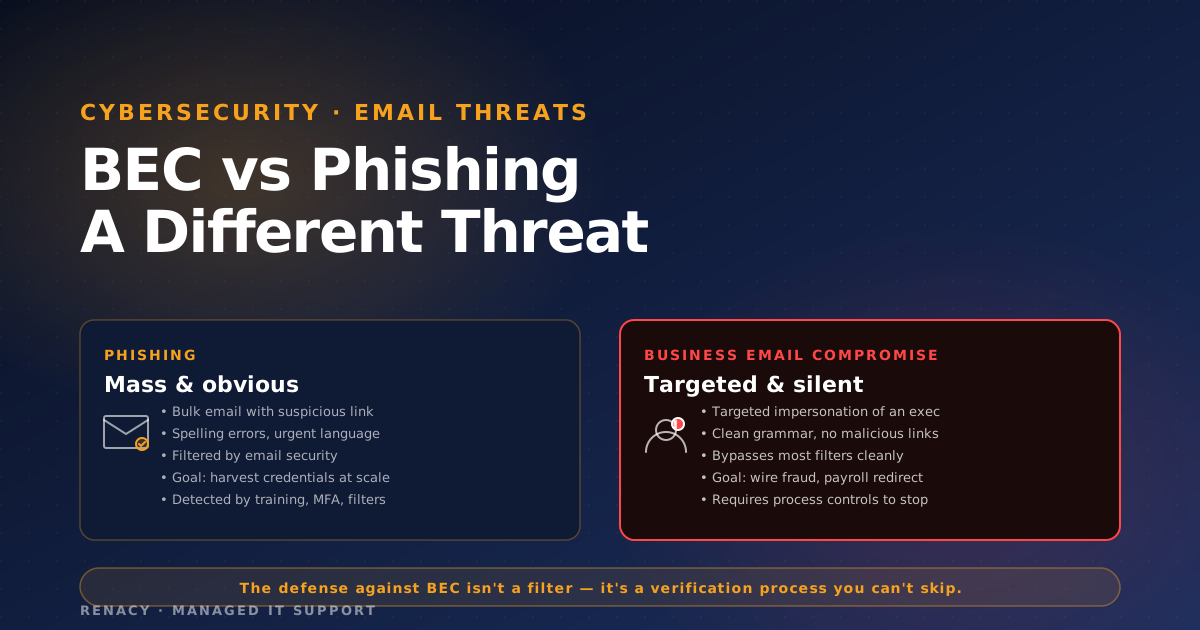
Phishing
Mass, payload-driven
- Bulk email with malicious link or attachment
- Goal: harvest credentials or deliver malware
- Often poor grammar, generic salutation
- Detected by email filters, link scanning, EDR
- Defense: filters, MFA, training, technical controls
Business Email Compromise
Targeted, social-engineering-driven
- One-to-one impersonation of a trusted party
- Goal: wire transfer, payment redirect, data theft
- Clean writing, specific to the recipient's role
- No malicious links — nothing for filters to flag
- Defense: process controls, out-of-band verification
The Four BEC Patterns That Actually Take the Money
Despite countless variations, BEC attacks consistently fall into a small number of patterns. Knowing the patterns helps employees spot them — and helps leadership build the right controls around them.
1. Vendor Invoice Fraud
The most common pattern and the largest dollar loss per incident. An attacker compromises a vendor's email account (or sends from a look-alike domain) and notifies your accounts payable team that the vendor's banking information has changed. The next legitimate invoice — which the AP team has been expecting — gets paid to the attacker's account.
What makes it dangerous: the request is coming from a real, ongoing business relationship. The amounts are normal. The attacker has often read months of email history and knows your specific approval workflows. By the time the actual vendor calls about the unpaid invoice, the money has cleared.
2. Executive Impersonation (CEO / CFO Fraud)
The classic "urgent wire request from the CEO." The attacker spoofs or compromises the executive's account and emails finance directly, often citing a confidential acquisition, a closing deadline, or a regulatory filing. The message is short, urgent, and includes specific wire instructions.
This pattern targets organizations with thinner approval processes — typically smaller companies where the finance team interacts directly with the CEO and where "urgent" from leadership genuinely happens often.
3. Payroll Diversion
An attacker impersonates an employee (often via a compromised personal email or a spoofed work address) and emails HR or payroll: "I've changed banks — please update my direct deposit to this account." One payroll cycle later, the employee's paycheck is redirected to the attacker. The employee discovers it when their actual paycheck doesn't arrive.
4. Real Estate & Closing Fraud
Concentrated in real estate transactions where six- and seven-figure wires are routine. The attacker compromises an email account in the transaction chain — title company, real estate agent, attorney — and sends "updated wire instructions" to the buyer days before closing. Buyer wires the down payment to the attacker. The actual closing fails. Recovery is rare.
Every BEC pattern works by inserting itself into a payment process that the target already trusts. There's no malicious link to click, no attachment to open, no obvious red flag. The message asks for something the recipient's job already requires them to do — pay an invoice, process a wire, update payroll details. The only defense is process discipline.
Why Most Email Security Tools Don't Stop BEC
Modern email security stacks — Microsoft Defender for Office 365, Proofpoint, Mimecast, Abnormal Security — have all gotten significantly better at BEC detection. But they still don't solve it, and understanding why is important.
No Malicious Payload
Filters that look for bad links and dangerous attachments have nothing to evaluate. A BEC message is just text. The malicious content is the intent, which a filter cannot see.
Look-Alike Domains Are Cheap
An attacker can register a domain that differs from yours by one character for a few dollars. DMARC/DKIM/SPF help on your own domains, but they don't prevent the attacker from sending from their own legitimate-looking domain.
Compromised Legitimate Accounts
If the attacker has actually taken over a vendor's real mailbox, the message comes from the genuine sender — sender authentication passes, the domain is correct, the conversation history is intact. There's no technical signal that something is wrong.
Behavioral Detection Has Limits
AI-driven email security can flag unusual patterns (a CFO who never asks for wires suddenly asking for one), but these tools throw false positives and require careful tuning. Many legitimate finance emails get flagged; many BEC messages still slip through.
What Actually Stops BEC
The hard truth: BEC is not primarily a technical problem, and the technical controls that help are well-known. The thing that consistently stops it — including the version of it that bypasses every filter — is a verification process that the organization treats as non-negotiable.
Mandatory Out-of-Band Verification
For any change to payment information (banking details, wire instructions, payroll direct deposit) and any wire transfer above a defined threshold, verification must happen through a channel different from the one the request arrived on. If the request came by email, verification is a phone call. If the request came by phone, verification is a callback to a number you already had on file — not a number the requester provides.
This single control prevents the majority of BEC losses when it's enforced consistently. The failure mode is always the same: the control exists in policy but gets skipped when the request is "urgent." The strongest version of this policy is the one nobody is allowed to override, including the CEO.
Dual Approval for Wires
Wire transfers above a defined dollar threshold require two named approvers, with documented approval workflow. This makes a single compromised account or single moment of misjudgment dramatically less consequential. The threshold should be set low enough that meaningful losses can't happen with a single sign-off.
Email Authentication (SPF, DKIM, DMARC)
These don't stop BEC, but they raise the cost of one of the easier attack patterns: someone spoofing your own domain to impersonate your executives internally. DMARC with a reject policy prevents external attackers from sending mail that appears to come from your domain. It's a necessary baseline.
Look-Alike Domain Monitoring
Tools that monitor for newly registered domains similar to yours give you early warning of attacks being prepared. They don't prevent the attack outright, but they let you alert finance and HR teams before the messages start arriving.
Employee Training Aimed at BEC Specifically
Most security awareness training focuses on phishing. Effective BEC training focuses on the specific patterns above and on the verification process — what to do when a vendor emails about banking changes, what the actual approval workflow is for wires, who to escalate to when something feels off. The goal is not skepticism. It's muscle memory for the verification step.
What Leadership Specifically Needs to Do
BEC defense is one of the few security areas where executive behavior is itself a primary control. The single most impactful thing senior leaders can do is publicly model and reinforce the verification process — including for their own requests.
| What Leadership Should Do | Why It Matters |
|---|---|
| Never make "urgent" payment requests by email-only channel | If your team never sees urgent wire requests from you by email, they'll be more likely to flag one that arrives |
| Tell finance directly: never act on payment changes without callback | Permission to slow down comes from the top, not from policy alone |
| Get briefed on actual BEC attempts targeting your company | Most companies see BEC attempts monthly — leadership rarely hears unless one succeeds |
| Approve dual-approval thresholds at a number that matters | A $50K threshold doesn't help if attacks are succeeding at $30K |
| Make the verification step explicit in vendor onboarding | Your vendors should expect a callback when banking changes — codify it in the relationship |
| Run a tabletop with finance and HR specifically on BEC | Tabletops surface the assumptions that fail under pressure |
Frequently Asked Questions
What's the difference between BEC and phishing?
Phishing casts a wide net with fake links or attachments designed to harvest credentials or deliver malware. Business Email Compromise (BEC) is targeted impersonation — usually of a CEO, CFO, vendor, or attorney — designed to trick a specific employee into authorizing a wire transfer, redirecting payment, or sharing sensitive information. BEC messages typically contain no malicious links or attachments, which is why most email security tools never flag them.
Why don't email filters catch BEC?
Most email filters look for malicious payloads — links to known bad domains, suspicious attachments, signs of impersonation in headers. BEC messages contain none of those. They're plain-text emails from look-alike domains or compromised legitimate accounts, with reasonable-sounding requests. To a filter, they look identical to legitimate business correspondence.
What is the most common BEC scenario?
Vendor invoice fraud is the most common. An attacker impersonates a known vendor (or compromises their email) and sends a "we've changed banks — please update our payment information" message. The next legitimate invoice is paid to the attacker's account. Variations include CEO/CFO wire requests, payroll diversion, and real-estate closing fraud.
How big is the financial impact of BEC?
BEC has been the FBI's most reported business cybercrime category by financial losses for multiple consecutive years, with annual U.S. losses in the billions of dollars. Individual incidents commonly range from tens of thousands to several million dollars. Recovery rates are low — once funds clear, they're typically moved through multiple accounts within hours.
What actually stops BEC?
Three things, in order: a mandatory out-of-band verification process for any payment change or wire request (call the known number, not the email's contact info); dual approval for wire transfers above a defined threshold; and DMARC/DKIM/SPF email authentication to make look-alike domain attacks harder. Technical controls help but the verification process is the load-bearing defense.
Related reading: Shadow IT: The Security Risk Already Living Inside Your Network →

Renacy is a managed IT support provider serving businesses across New York, New Jersey, Pennsylvania, Connecticut, Massachusetts, Maryland, and Washington DC. Our team specializes in proactive device monitoring, helpdesk support, cloud backup & disaster recovery, and network infrastructure management. Learn more about Renacy →