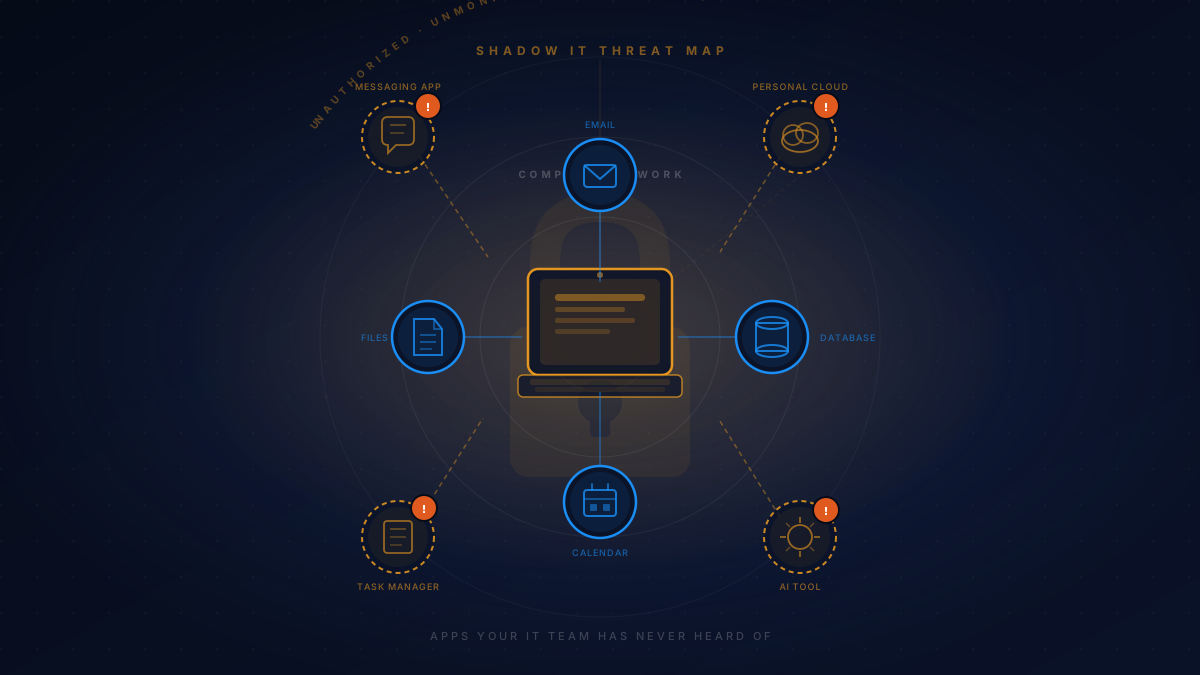
Your employees are using apps your IT team has never heard of. Cloud storage tools, AI assistants, messaging platforms, project management apps — downloaded and connected to company data without a single ticket being submitted. This is shadow IT, and it's already inside your network right now.
Shadow IT isn't new, but it's grown dramatically alongside the explosion of easy-to-use cloud tools. When an employee needs something their official toolset doesn't provide, they don't wait for an IT approval process — they Google an alternative, enter their work email, and start using it in minutes. The app is free, it solves their problem, and they don't think twice about the security implications.
The challenge for IT and security teams is that they can't protect what they don't know exists. Every unauthorized tool is a potential gap in your security posture — an entry point that bypasses your controls, your monitoring, and your incident response plans.
What Qualifies as Shadow IT?
Shadow IT is any technology used in the workplace without the knowledge or approval of the IT department. It covers a wider range of tools than most people realize:
- Personal cloud storage — using a personal Google Drive or Dropbox account to share work files because it's faster than the approved system
- AI tools and chatbots — pasting client data, contract language, or internal documents into public AI assistants to summarize or reformat them
- Communication apps — WhatsApp, Telegram, or personal email threads for work conversations that should stay inside corporate systems
- SaaS subscriptions — departments quietly purchasing software on a credit card to avoid IT procurement delays
- Browser extensions — productivity tools installed without review that have broad access to browser activity and data
The common thread: these tools touch real company data and operate completely outside your security controls.
The Four Ways Shadow IT Puts Your Business at Risk
Data Exposure You Can't See
When sensitive data leaves your managed environment — even briefly — you lose visibility and control. Customer records stored in a personal Dropbox, financial data pasted into a public AI tool, or contract language in an unmanaged messaging app all represent data that's outside your protection perimeter.
Compliance Violations You Didn't Know You Were Making
Regulations like HIPAA, SOC 2, and GDPR require you to know where regulated data lives and how it's protected. Shadow IT creates undiscovered data flows that can put you in technical violation without any malicious intent — and the fact that you didn't know is not a defense during an audit.
Incident Response Becomes a Guessing Game
When a breach occurs, your incident response team needs to trace data movement and identify affected systems. Shadow IT means unknown data pathways and unmonitored endpoints that make it nearly impossible to scope an incident accurately, extending response time and remediation cost significantly.
Account Credentials Across Unvetted Platforms
Employees often reuse passwords. When a shadow IT tool suffers a breach, the credentials they used there — potentially the same as their corporate login — are now in the hands of attackers. This is one of the most common pathways to initial corporate access that security teams see.
Industry research consistently finds that large organizations use three to ten times more cloud services than their IT departments are aware of. For smaller and mid-sized businesses, the ratio is often worse — fewer IT controls mean more undiscovered tools operating in the environment.
Why Blocking Everything Doesn't Work
The instinctive response to shadow IT is a blanket prohibition — ban unauthorized tools, lock down devices, block unapproved domains. This approach consistently backfires for two reasons.
First, employees don't stop needing the functionality that drove them to shadow IT in the first place. If the approved project management tool is difficult to use and a team adopts a better alternative, blocking it doesn't fix the underlying workflow problem — it just forces the team to find a less visible workaround, which is almost always less secure.
Second, overly restrictive IT environments push shadow IT further underground. When employees learn that asking for something they need means a lengthy approval process or an automatic no, they stop asking at all. That makes the shadow IT you're unaware of even more dangerous, because employees actively conceal it.
The goal isn't zero shadow IT — that's unattainable in any modern organization. The goal is visibility, managed risk, and a culture where approved alternatives are better than the unauthorized ones.
Five Steps to Get Ahead of Shadow IT
Audit what's actually running in your environment
You can't address what you don't know about. DNS query analysis, network traffic monitoring, and endpoint management tools can reveal the full spectrum of applications and cloud services your team is actually using — often revealing dozens of tools no one in IT knew about.
Build a fast, frictionless approval process
If it takes four weeks to get a new SaaS tool approved, employees will find workarounds. A lightweight intake process — a simple form, a review within a few business days, clear criteria for approval — removes the friction that drives shadow IT in the first place.
Write a clear, human-readable acceptable use policy
Most employees who use shadow IT aren't trying to create security problems — they just don't know there's a policy or why it matters. A policy that explains what's allowed, what isn't, and the specific reasons why translates compliance into understanding. People follow rules they understand and agree with.
Deploy a Cloud Access Security Broker (CASB) solution
CASB tools sit between your users and cloud services, providing visibility into what's being used, the ability to enforce policies, and data loss prevention for sensitive information. For organizations with significant cloud usage, CASB is often the most effective technical control against shadow IT risk.
Make security awareness training specific and ongoing
Annual compliance checkboxes don't change behavior. Training that explains real scenarios — "here's what happened when an employee pasted client data into a public AI tool" — creates the context employees need to make better decisions in the moment. Pair it with regular communication about approved alternatives.
How a Managed IT Provider Reduces Shadow IT Exposure
Shadow IT thrives in IT environments where visibility is limited and the gap between what employees need and what IT approves is wide. A managed IT provider closes both gaps simultaneously.
On the visibility side, an MSP deploys and maintains the monitoring infrastructure needed to detect unauthorized tools — DNS filtering, endpoint detection, network traffic analysis — and maintains it as part of ongoing operations rather than a periodic audit project. When a new cloud service appears in your environment, it's flagged, reviewed, and addressed systematically.
On the culture side, an MSP brings mature processes for software requests, approvals, and user communication that most in-house IT teams at smaller organizations simply don't have the bandwidth to build and maintain. The approval process becomes fast enough that employees don't feel compelled to go around it.
Renacy managed IT plans include continuous endpoint monitoring with application inventory, DNS-level filtering to block high-risk categories, quarterly shadow IT review as part of your technology health report, and security awareness training resources for your team. Shadow IT visibility is included — not an add-on.
Frequently Asked Questions

Renacy is a managed IT support provider serving businesses across New York, New Jersey, Pennsylvania, Connecticut, Massachusetts, Maryland, and Washington DC. Our team specializes in cybersecurity, shadow IT discovery, proactive device monitoring, and network infrastructure management. Learn more about Renacy →